
Monday, April 26, 2010
Limera1n to Jailbreak The iPhone OS 4.0 iPad
Features of iPhone OS 4.0
Here are new features of iPhone OS 4.0
Here is just a small list of the new features you can expect to see in the iPhone OS 4.0:
* Multitasking: This is the feature that iPhone users have wanted the most, and with OS 4.0 they finally get it. The idea seems dead simple – double tap the Home button and this brings up a task switcher. Select the app you want and it pops into the foreground. Seems simple, but it’s taken Apple a long time to get this much-wanted feature to users.
As a bonus, some applications such as those playing audio (such as Pandora) will continue to play the audio while in the background much like the iPod part of the iPhone does now.
* App folders: Group apps into folders.
* Fast app switching: Background apps aren’t really running in the background in the traditional sense, only certain aspects of them. But, when you switch from an app, its state is saved so you can quickly and easily switch back to it.
* Notifications: A notification system that allows background apps to communicate with the user.
* Updated mail app: All sorts of updates here, from multiple Exchange accounts to threaded messages.
* iBooks: Yep, read books on your iPhone and iPad.
* iAd advertising: Expect apps to get a LOT more cluttered as Apple gives developers a plugin ad module.
* 5x digital zoom: Get more zoom from your camera …
* Game center: A centralized gaming service allowing users to connect with others wanting to play games.
Read More...
Here is just a small list of the new features you can expect to see in the iPhone OS 4.0:
* Multitasking: This is the feature that iPhone users have wanted the most, and with OS 4.0 they finally get it. The idea seems dead simple – double tap the Home button and this brings up a task switcher. Select the app you want and it pops into the foreground. Seems simple, but it’s taken Apple a long time to get this much-wanted feature to users.
As a bonus, some applications such as those playing audio (such as Pandora) will continue to play the audio while in the background much like the iPod part of the iPhone does now.
* App folders: Group apps into folders.
* Fast app switching: Background apps aren’t really running in the background in the traditional sense, only certain aspects of them. But, when you switch from an app, its state is saved so you can quickly and easily switch back to it.
* Notifications: A notification system that allows background apps to communicate with the user.
* Updated mail app: All sorts of updates here, from multiple Exchange accounts to threaded messages.
* iBooks: Yep, read books on your iPhone and iPad.
* iAd advertising: Expect apps to get a LOT more cluttered as Apple gives developers a plugin ad module.
* 5x digital zoom: Get more zoom from your camera …
* Game center: A centralized gaming service allowing users to connect with others wanting to play games.
Friday, April 23, 2010
cop@vsnl.net Recovering Stolen Mobiles
Using the IMEI number-The International Mobile Equipment Identity (IMEI) number we can easily recover Stolen Mobiles by tracing the mobile via a complex system of GPRS and internet.
Mobile phone users can get their 15 digit IMEI number by dialling *#06# on their mobile handset. Mobile phone owners should make a note of their IMEI number and keep the details in a safe place.
If u lost your mobile, send an e-mail to cop@vsnl.net with the following info.
Mobile phone users can get their 15 digit IMEI number by dialling *#06# on their mobile handset. Mobile phone owners should make a note of their IMEI number and keep the details in a safe place.
If u lost your mobile, send an e-mail to cop@vsnl.net with the following info.
- Your name:
- Address:
- Phone model:
- Make:
- Last used No.:
- E-mail for communication:
- Missed date:
- IMEI No.:
Wednesday, April 07, 2010
Jailbreak and Unlock iPhone 3GS
Here is the step by step guide to unlock your iphone 3GS
http://www.ihackintosh.com/2009/11/jailbreak-unlock-iphone-3g-3gs-3-1-2-with-blackra1n/
Happy Unlocking and Jailbreaking :)
http://www.ihackintosh.com/2009/11/jailbreak-unlock-iphone-3g-3gs-3-1-2-with-blackra1n/
Happy Unlocking and Jailbreaking :)
Tuesday, March 02, 2010
Introduction to Informix 4GL
Hi guyz.
After a long time I am back to Blogger. I was busy these days. basically i was not in touch with the blogger.
These days I started learning Informix 4GL on UNIX.
4GL to say is a superb language in the olden days as it has Forms, Reports and Database on a single HP-Unix Server. Unlike the latest technologies which has Db on some server and Development on some other.
And the space occupied by these 4gl is very small. As it is on Unix, it doesnot require high configuration at all.
Informix 4gl is a Fourth-Generation Programming Language(4GL). You might be wondering what is 4GL here.
If you look at the generations of Programming Languages, there are 1GL, 2GL, 3GL, 4GL, 5GL. The higher version is based on the earlier version.
Read More...
After a long time I am back to Blogger. I was busy these days. basically i was not in touch with the blogger.
These days I started learning Informix 4GL on UNIX.
4GL to say is a superb language in the olden days as it has Forms, Reports and Database on a single HP-Unix Server. Unlike the latest technologies which has Db on some server and Development on some other.
And the space occupied by these 4gl is very small. As it is on Unix, it doesnot require high configuration at all.
Informix 4gl is a Fourth-Generation Programming Language(4GL). You might be wondering what is 4GL here.
- 1GL is a machine level programming lanugage.
- 2GL is a generational way to categorize Assembly languages.
- 3GL is refinement of 2GL. 3GL includes Basic, C, C++, C#, Pascal and Java. 3GL support structured programming
- 4GL is designed to reduce programming effort, the time it takes to develop the software and the cost of software development.
- 5GL is based on solving problems using constraints given to the program, rather than using an algo written by programmer.
Now coming to Informix - 4GL, it is developed by Informix in 80s. It includes SQL, Forms.
It is called as IBM Informix, as the company Informix is taken over by IBM in 2000.
Tuesday, June 30, 2009
Unlock/Jailbreak iPhone 2g/3g Using redsn0w
In this Iphone Tutorial you will learn about how to Update + Unlock + Jailbreak your iPhone 2G using iTunes and redsn0w.


Read More...
Note:
- This iPhone Tutorial is only for iphone 2G users who want to upgrade their firmware to 3.0.
- Also This iPhone Tutorial is for users who are using Windows XP Operating System on their machine.
So If you are a Windows User and have iPhone 2G in your hands and want to upgrade to OS 3.0.. please go ahead.... :)
Before starting the Tutorial please download the below items
- iTunes must be of version 8.2.Click here if you want to get the 8.2 iTunes.
- OS 3.0 for iPhone 2G : iPhone1,1_3.0_7A341_Restore.ipsw.
- Redsn0w : Mirror 1 | Mirror 2 (Torrent).
- BL 3.9
- BL 4.6
After downloading all the above items. Extract the redsn0w zip. Place the ipsw file and BL 3.9, 4.6 files into the same folder. Now your folder will look like this.
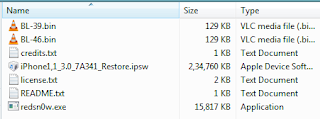

You are ready for the iphone Upgrade.
Step 1: Connect your iPhone 2G to your PC and launch iTunes.

Step 2 : From the left pane in iTunes, select your iPhone. Now hold down the SHIFT Key and Restore button to select the ipsw file. Navigate to the redsn0w folder created earlier and select the ipsw file (iPhone1,1_3.0_7A341_Restore.ipsw).


Now iTunes will start restoring your iPhone to OS 3.0. Please wait until the restore completes.


Here starts the Unlock and Jailbreak...
Step 3 : Now your iPhone is updated. Here are the steps to Unlock and Jailbreak your iPhone. Select the redsn0w.exe present in the redsn0w folder.

Step 4 : From redsn0w click the Browse Button and select the ipsw file (iPhone1,1_3.0_7A341_Restore.ipsw)
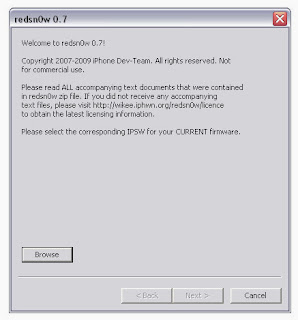

Step 5 : redsn0w will verify your firmware. When it's done click on the Next Button to continue.


Step 6 : Check the checkboxes Intall Cydia, Icy and Unlock and click on Next to continue.

Step 7 : Now you need to select the BL 3.9 and BL 4.6 files. Click on the browse buttons and select accordingly.
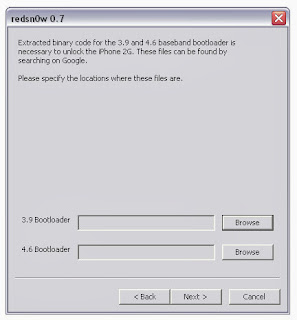

Step 8 : Now Connect your iPhone to PC and Turn Off iPhone if it is ON. Click on the Next button to continue.
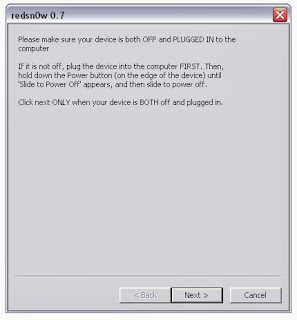

Step 9 : Follow the instructions given by redsn0w. The below steps are for entering the iPhone into DFU Mode.


Step 10 : Once your iPhone gets into DFU Mode, redsn0w jailbreaks and unlocks the iPhone. Be Patient now. The iPhone reboots couple of times.

Step 11 : After the completion, redsn0w will notify you that you are done. Click the finish Button. Meanwhile iphone completes reboot and jailbreak, it will run BootNeuter.

That's it.
You are done with the Update, Unlock and Jailbreak of your iPhone 2G using Windows and Redsn0w.
I am using iPhone 2g Os 3.0 with Airtel in India. :)


Please leave your comments below. Do follow my blog for the other iphone updates.
Thanks :)


